The problem: Windows 10 at EOL, no TPM 2.0
On October 14, 2025 Microsoft stopped publishing security updates for Windows 10 Home and Pro. Every month without patches multiplies the risk that a new vulnerability — the next EternalBlue or PrintNightmare — stays open forever. For an SMB or a workstation handling business data, that's not optional.
Microsoft's official path is clear: upgrade to Windows 11. But Windows 11 requires TPM 2.0 and a CPU on the compatibility list (Intel 8th gen / AMD Zen 2 or later). This client's PC — like many from 2017 or older — doesn't qualify. You can install Windows 11 bypassing the TPM check with the Media Creation Tool bypass, but that's exactly where security cracks: Microsoft has said these PCs won't get critical patches going forward, and features like BitLocker, Virtualization-Based Security and Credential Guard all depend on the TPM. Translation: you install Windows 11, but end up worse protected than a Windows 10 LTSC.
The two real options I evaluated
For PCs without TPM 2.0 there are two defensible routes. I put them on the table with the client:
| Criterion | ESU via MAS (Win 10 Home/Pro) | Migrate to Windows 10 LTSC IoT |
|---|---|---|
| Support until | Oct 2026 (free) · Oct 2027 (extended) | January 2032 (build 21H2 IoT Enterprise LTSC) |
| How you get it | Script from massgrave.dev enables ESU bypass | Official ISO + OEM key + in-place upgrade |
| Telemetry / Bloatware | Same as Windows 10 Home/Pro (Cortana, Edge, Store, AI) | Minimal — no Cortana, no Store by default, no feature updates |
| Visual changes | None | None — still looks like regular Win 10 |
| Legality / activation | License bypass (grey area, your own risk) | Legitimate OEM IoT Enterprise LTSC key (legal and transferable with the hardware) |
| Approximate cost | $0 USD | $25–60 USD one-time (OEM key) |
| Reinstalls the OS | No — just unlocks patches | Yes — in-place upgrade that preserves files, apps and settings |
My client picked the LTSC IoT option. Three reasons: (1) six years of official support vs one and a half, (2) legitimate license without depending on an activation script, (3) a cleaner machine (no Cortana, no updates restarting mid-work, no constant push toward Win 11).
Windows 10 LTSC Enterprise was only sold to businesses with a Volume Licensing contract (minimum 5 seats, and new sales discontinued). The IoT Enterprise LTSC version has the same binary and the same support until 2032, but it's distributed with single-unit OEM licenses any integrator can buy from authorized distributors. For an individual PC it's the legally correct option.
Official support — the dates that matter
This is the table that closes out each Windows release. It's why LTSC IoT is the elegant exit for hardware left behind by Windows 11:
| Windows version | Official end of support | Comment |
|---|---|---|
| Windows 10 Home / Pro (22H2) | Oct 14, 2025 | EOL — needs ESU or migration |
| Windows 10 Home / Pro + ESU | Oct 13, 2026 (consumer) | Only 1 extra year. Enterprise until 2028 (paid) |
| Windows 10 Enterprise LTSC 2021 | Jan 12, 2027 | Volume Licensing only, hard to source now |
| Windows 10 IoT Enterprise LTSC 2021 | Jan 13, 2032 | Available with single OEM key |
| Windows 11 Home / Pro 24H2 | ~ 2027 (depends on channel) | Requires TPM 2.0 + supported CPU |
| Windows 11 IoT Enterprise LTSC 2024 | Oct 10, 2034 | But also requires TPM 2.0 |
For a PC without TPM 2.0, Windows 10 IoT Enterprise LTSC 2021 is the only official route with real support beyond 2027. And the gap between "support until 2026" and "support until 2032" is six extra years of useful life for perfectly functional hardware.
Step by step what I did
1. Full backup of the PC
Before touching anything: full disk image to an external drive, plus a copy of the user folders (Documents, Desktop, Pictures) and a browser favorites export. The in-place upgrade is reliable but not 100% — a power cut mid-process leaves the PC unbootable, so the image is the insurance policy.
2. Download the Windows 10 IoT Enterprise LTSC 2021 ISO (en-US)
The official ISO is available for distributors at the Microsoft Volume Licensing Service Center. Integrators like me also get it through OEM channels or Microsoft evaluation sites. The version ships only in English (en-US) — no localized edition exists. This will matter in step 3.
3. Switch the language to en-US — the first trick
The LTSC IoT installer refuses to do an in-place upgrade keeping files and apps if the system language doesn't match the ISO. The client's PC was in Spanish. First we get the system to en-US.
Windows 10 single language doesn't allow language switching from Settings. You download the language pack .cab with the GUI script W10_11LangPack:
With the en-US .cab downloaded, install it via DISM in an elevated PowerShell:
dism /Online /Add-Package /PackagePath:C:\path\to\langpack-en-us.cabThen set the display language under Settings → Time & language → Language → English (United States). Restart and sign out.
4. The registry trick — EditionID = IoTEnterpriseS
Before offering "Keep personal files, apps and settings", the LTSC IoT installer checks whether the current system already identifies as IoT Enterprise. If it finds Home or Pro it only allows a clean install. The workaround is to trick it by editing a registry value:
reg add "HKLM\SOFTWARE\Microsoft\Windows NT\CurrentVersion" /v EditionID /d IoTEnterpriseS /fRight after that command (no reboot), I mounted the ISO and ran setup.exe. At this point the installer offered the golden option: "Keep personal files, apps and Windows settings".
The EditionID change is temporary and only used so setup accepts the upgrade. Once the install finishes, the system genuinely is IoT Enterprise LTSC and the value matches the real OS — nothing to revert. If the install fails and you abort, do restore the original value (Core for Home, Professional for Pro).
5. Activation with a legitimate OEM key
I sold the client an OEM key for IoT Enterprise LTSC 2021 that binds to the hardware and stays activated permanently. It's a legitimate license and stays with the machine (as long as the motherboard isn't swapped). If you need an OEM key for this case, message me on WhatsApp.
6. Restore Spanish and clean up
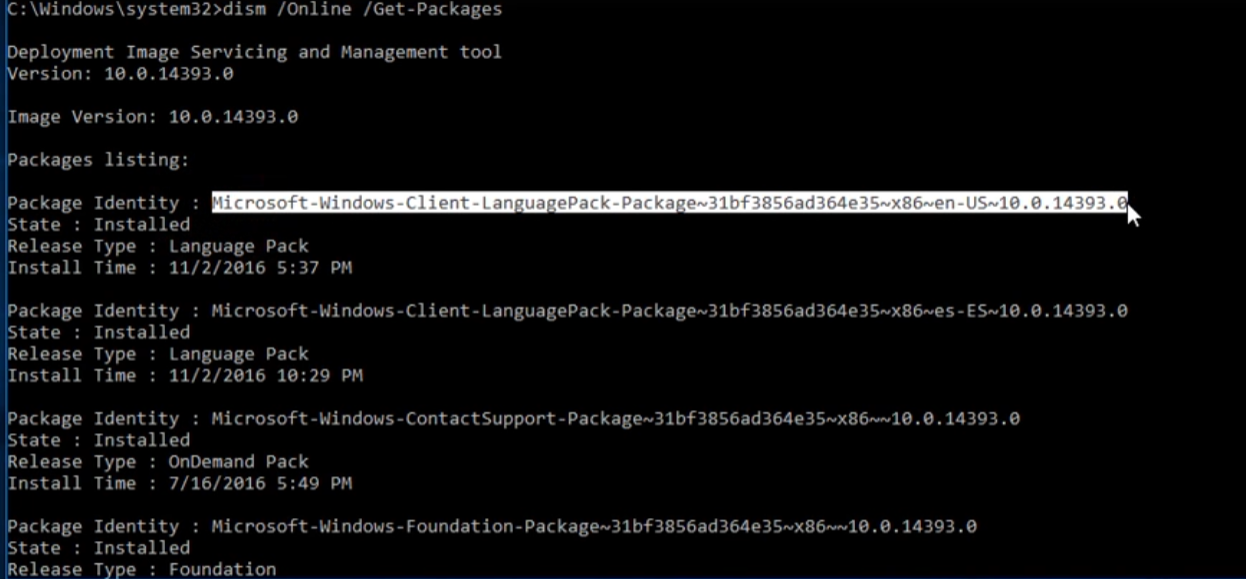
Once the PC booted as LTSC IoT 2021, I downloaded the es-CO language pack again (with W10_11LangPack), installed it via DISM and set it as the primary display language. To leave it even cleaner I removed the en-US pack with:
dism /Online /Get-Packages
dism /Online /Remove-Package /PackageName:Microsoft-Windows-Client-LanguagePack-Package~31bf3856ad364e35~amd64~en-US~10.0.19041.x
(The exact package name comes from the first command's output — fully documented in the KB with all DISM commands.)
End result: ~98% of the system in Spanish. A few legacy windows and shell strings stay in Spanglish because the LTSC IoT base package is en-US and some strings don't get translated, but the user notices nothing odd in daily use.
7. Repair broken AppX packages
After any in-place upgrade it's common for the Start menu to lose some icons or for apps like Calculator or Settings to stop opening. A single command reinstalls them from the manifests already on disk:
Get-AppXPackage -AllUsers | Foreach {Add-AppxPackage -DisableDevelopmentMode -Register "$($_.InstallLocation)\AppxManifest.xml"}When to pick each route — quick guide
| If your PC… | The sensible route is |
|---|---|
| Supports TPM 2.0 + Win 11 compatible CPU | Clean upgrade to Windows 11 24H2 |
| No TPM 2.0, light home use (1–2 more years) | ESU via MAS until Oct 2026/2027 |
| No TPM 2.0, work use with important data | Migrate to Windows 10 IoT Enterprise LTSC 2021 (support until 2032) |
| No TPM 2.0, very old hardware (< 4GB RAM, HDD) | Lightweight Linux (Mint XFCE, LMDE) — or replace the machine |
What we gained in the end
A perfectly functional PC, headed for "no more security updates" and likely the planned-obsolescence pile, ended up with:
- Official Microsoft support until January 2032 — six more years of critical patches.
- Legitimate OEM license, not an activation script.
- Cleaner system than the original Windows 10 Pro: no Cortana, no suggestions, no Microsoft Store loaded by default, no feature updates that reboot without warning.
- All client files, apps and settings preserved: Office installed, browser with its passwords, printer connected, desktop shortcuts, all intact.
- ~98% of the system in Spanish after restoring the language pack.
The client paid for an OEM key and a few hours of service. I spared him from having to buy a new PC just because Microsoft decided his CPU "isn't supported anymore". That, to me, is what good IT support looks like: extending the useful life of hardware where it makes sense, without forcing extra spend.
If you want to apply this same procedure
I bundled all step-by-step commands (DISM, registry, in-place upgrade scripts, MAS, AppX repair) as a shareable resource in my knowledge base:
KB — Change Windows version and language with DISM and in-place upgrade
If you'd rather have me do it on your PC (Cartagena or remote), message me on WhatsApp. I also sell legitimate OEM keys for IoT Enterprise LTSC 2021.